Silent Failure Watch: n8n alerts when a workflow stops without an error
Disclosure first
This page contains an affiliate link. If you buy through it, we earn a commission at no extra cost to you. The vendor provided a free copy of the workflow pack, and everything below comes from reading its workflow files, its README and the vendor's emails. We have not completed a live alert test, and we say so rather than pretend otherwise.
The short answer
Silent Failure Watch is a set of n8n workflows you import into your own instance. They watch your other workflows and send one plain email when something stops without throwing an error: a trigger switched off, a workflow renamed, a last run that failed, or a gap longer than the threshold you set. It needs a self-hosted n8n with API access, and it is honest about the case it cannot cover: if n8n itself is down, nothing inside n8n can warn you, so it pings an external uptime monitor instead.
What it actually does
These are ordinary n8n workflows, which is the point: you can open them and read every step before you trust them. Here is what the files do.
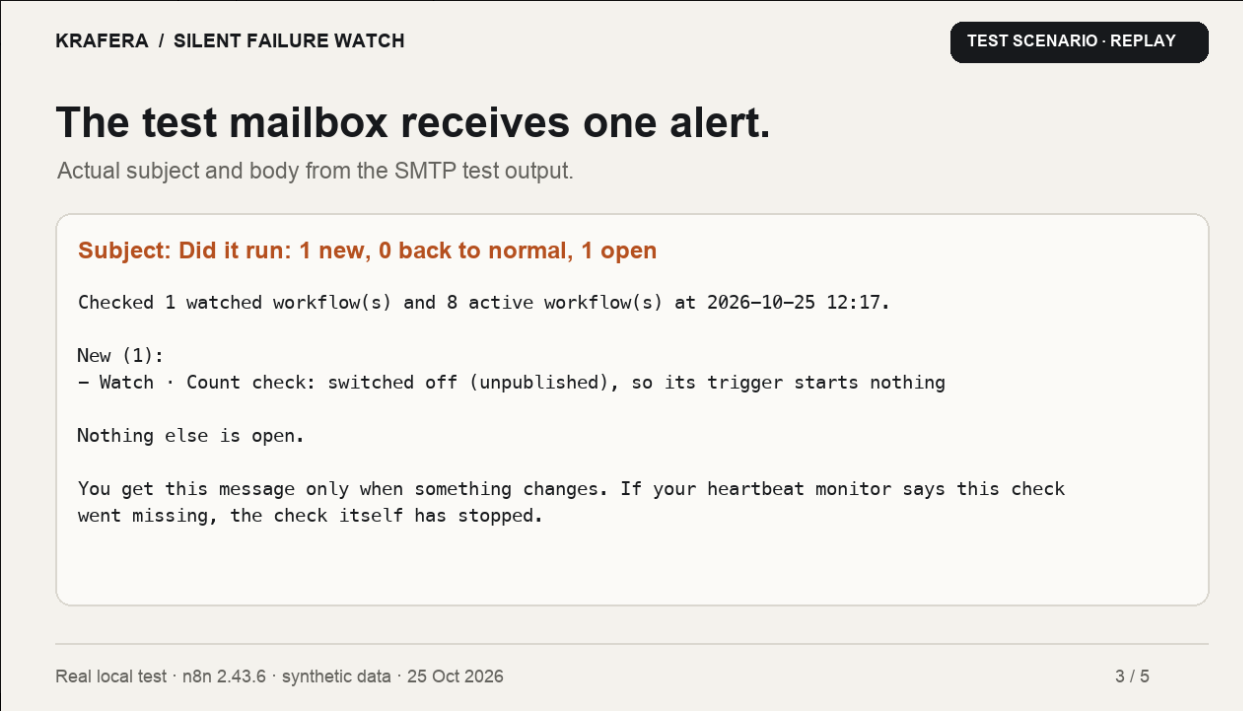
- Did it run runs every 15 minutes. It asks the n8n API for each watched workflow's last execution and last successful execution, then compares that against the quiet threshold you set in a data table called
watch_list. - Count check runs every morning at 07:00. It reads yesterday's rows at a source and at a destination, matches them on an id field (order_id in the shipped examples), and sends one message listing what is missing, extra or different, or telling you the source returned nothing. That is how it catches "the sync wrote 40 of 50 orders", once you point it at your own source and destination.
- Error alert is a workflow you attach as the error handler on your own workflows, so a failed execution mails you the node and the run.
- State is remembered, so the same open problem does not email you every 15 minutes. One message when something breaks, one when it comes back.
- Heartbeat is a ping to any uptime service after each check. That is the only way to notice that n8n, or the whole server, has stopped.
What we verified, and what we did not
The pack ships with a LIMITS.md that lists what was tested and what was not: n8n 2.43.6 self-hosted in Docker and a 3.0.1 pre-release, with a written result for each check, including the failures (the Count check needs its Wait node on 3.0, and two repeat-window checks failed once while the machine was busy). That file is the reason this page can be specific about behaviour instead of guessing.
We imported the Core pack into n8n 2.45.7. It loaded cleanly: nine nodes in the error alert workflow, the settings node, the data table creation, the API calls and the mail step are all there and readable. The data table and the watch list behave as described.
We did not complete a live alert test, and the blocker is worth knowing before you buy. n8n Cloud does not allow API access on the free trial. The did-it-run workflow cannot read executions without an API key, so on a trial the import works and the first run has nothing to talk to. The vendor's position, which matches the README: self-hosted is the only setup they have tested, and n8n Cloud is listed as not tested. The n8n public API is available on paid Cloud plans, where the instance address plus /api/v1 would be the base URL, but nobody has run these checks there yet.
The limits worth knowing
- It matches workflows by name, not by ID. Rename a watched workflow and the check reports that no workflow has that name. You will hear about it, but the monitoring has to be updated by hand.
- Fifteen minute granularity. A quiet threshold below 15 minutes does not mean much, because that is how often the check itself runs.
- n8n down means silence. Nothing inside n8n runs when n8n is not running, so the heartbeat ping to an outside service is not optional if you care about the server case.
- Cloud backup is not a backup. The Full pack includes a nightly backup workflow that writes files to disk, and n8n's own documentation says files written on Cloud are not guaranteed to persist. Self-hosted only, if you want that piece to mean anything.
- An API key is broad access. The workflows need an n8n API key, which can read and change more than executions. Treat that credential as sensitive.
Who it is for
You run n8n yourself, you have a handful of workflows doing real work, and you have already had the experience of noticing three days late that something stopped. The pack is the cheapest version of that alarm: three workflows, plain email, no dashboard to check.
It is not for you if you are on the n8n Cloud trial, if you want a hosted monitoring product with an app and on-call rotation, or if you only have one workflow that you check daily anyway.
If you want it
Three versions on the product page: a single workflow, the Core pack of three, and the Full pack of nine with the handover template. Our contact with it was the Core pack, so that is the one this page is really about. Readers of VOXA can use code VOXA20 at checkout.
Silent Failure Watch on Gumroad
Affiliate link. We earn 70 percent of a sale made through it. The price is the same either way, and the code gives you 20 percent off.
Questions people are asking
Do I need to know how to code to use this?
No. You import ready-made workflows and fill a settings node. But you do need to run your own n8n instance and create an API key.
Will it work on n8n Cloud?
The trial will not, because Cloud blocks API access on the free trial. Paid Cloud plans expose the API, but the vendor lists Cloud as not tested. Self-hosted is the supported path.
What happens if n8n itself goes down?
Nothing inside n8n can run, so no alert is sent. That is why the workflow pings an external uptime service after every check: the outside service notices when the pings stop.
Will it spam me with emails?
It keeps the state of what is already open, so one problem produces one message. You get a second message only when it comes back to normal.
Is this better than a normal uptime monitor?
They solve different problems. An uptime monitor checks whether a URL answers. This checks whether your workflows actually ran, which is the failure mode that usually goes unnoticed.