ChatGPT Free vs Claude Free: Same 5 Prompts, Tested (2026)
Most comparisons of these two tools open with the paid plans. As a student, I wanted the boring question answered: what do the free versions actually give me, on the work I do every week?
I have used both for about eight months, mostly on the free tiers. Instead of guessing which one is better, I wrote five prompts that cover what a student actually does - an essay, a bit of code, a summary, a percentage question and a resume line - and ran each one in both tools, in a fresh chat, with no follow-ups.
How I tested
- Five prompts, one new chat each. No follow-ups, no retries, and no edits to the prompt after seeing an answer.
- Both on the free plan on 16 November 2026, between 1:05 and 2:20 AM IST. Claude showed Sonnet 5.5 on Medium. ChatGPT Free did not display a model name; it picks one for you.
- Every answer kept. The screenshots below are the replies as they arrived, not the ones I would have written.
- Scored 1-5 on three things: was it correct, did it follow the instruction, and how much would I have to edit before using it.
- One caveat. AI answers vary from run to run, so a second run could score differently. This is one run, on one night, with five prompts.
Round 1: The essay
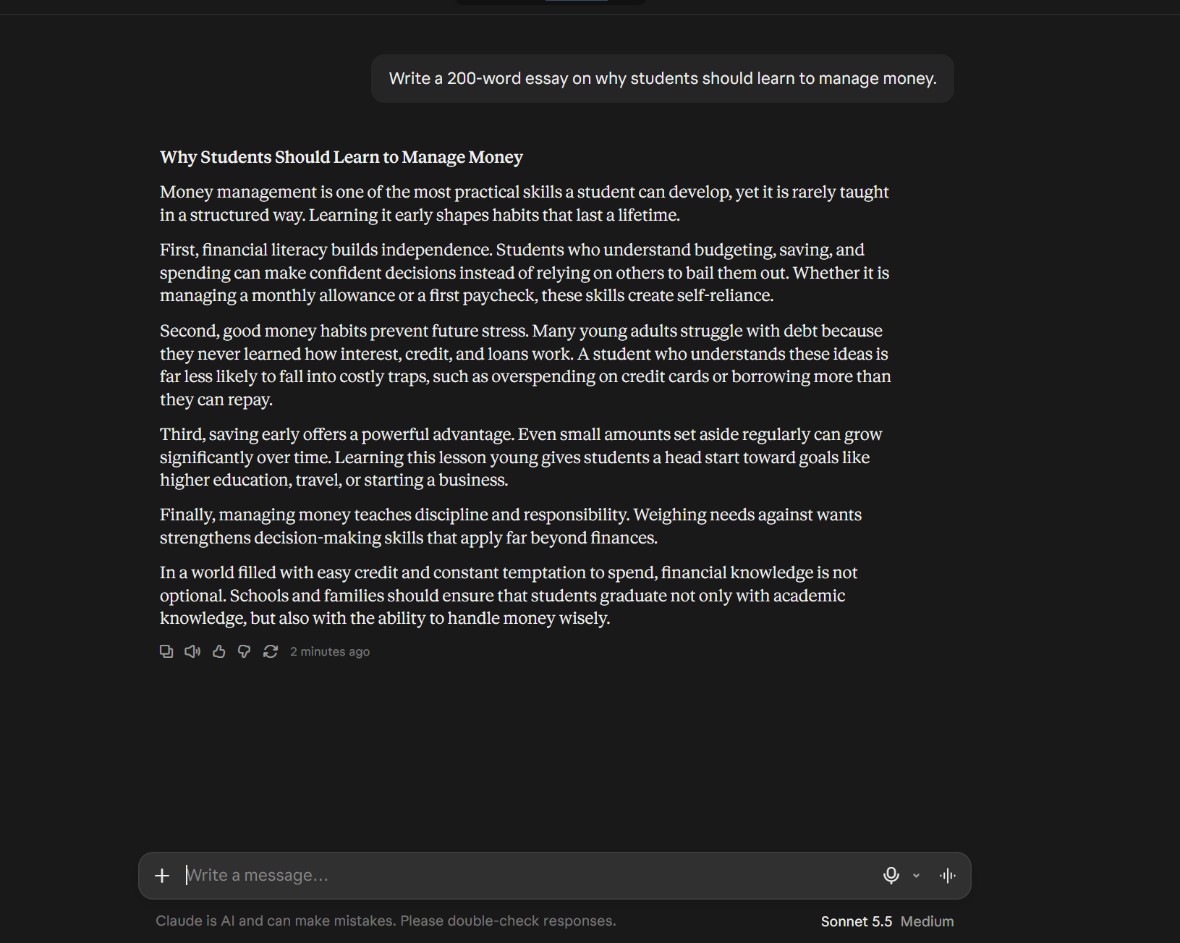
Prompt: "Write a 200-word essay on why students should learn to manage money."
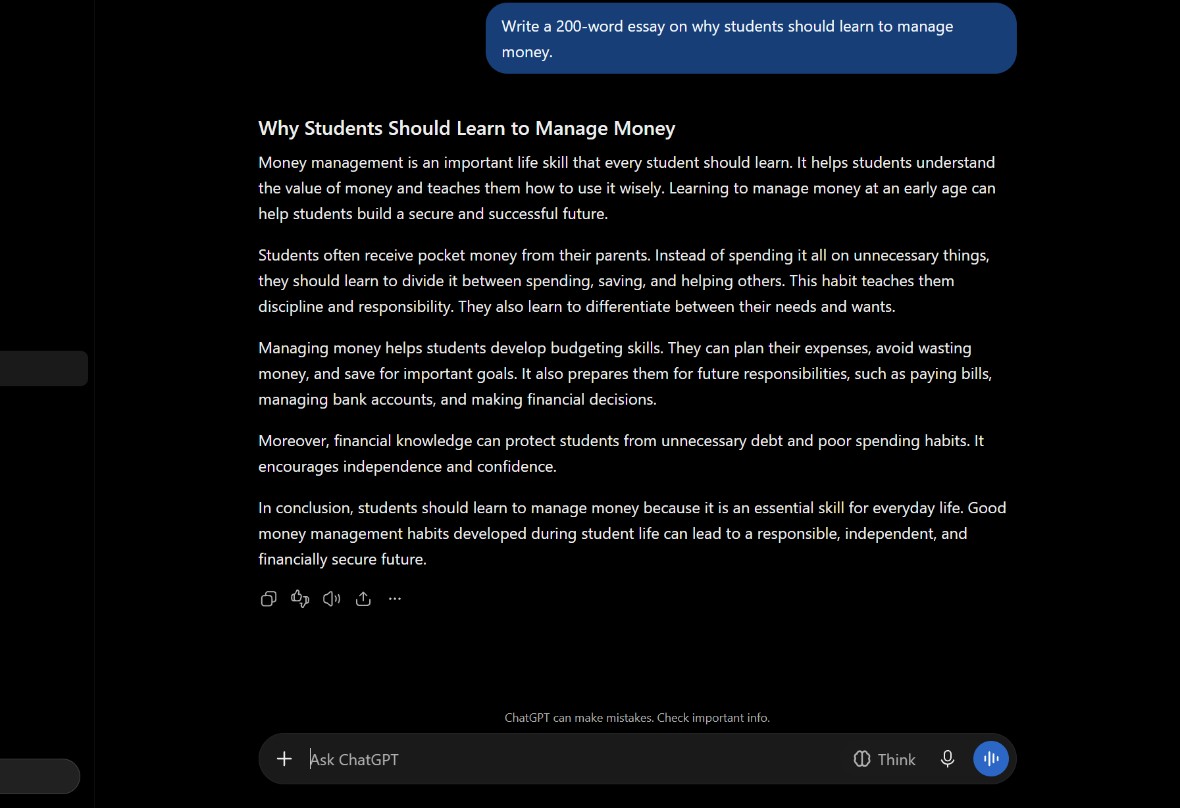
ChatGPT came in at about 185 words and followed the shape exactly: title, four paragraphs, conclusion. It reads like a school essay, which is what the prompt asked for, but the middle paragraphs are flat and could swap places without anyone noticing.
Claude wrote the better sentences - "financial literacy builds independence", the point about interest and credit cards - but ran to roughly 240 words. That is around 40 over the limit, and someone has to cut them before it can be submitted.
ChatGPT 4/5, Claude 3/5. Winner: ChatGPT, because the prompt had a word limit and only one of them stayed near it.
Round 2: The coding question
Prompt: "Write a Python function that checks whether a number is prime, and explain it in simple words."
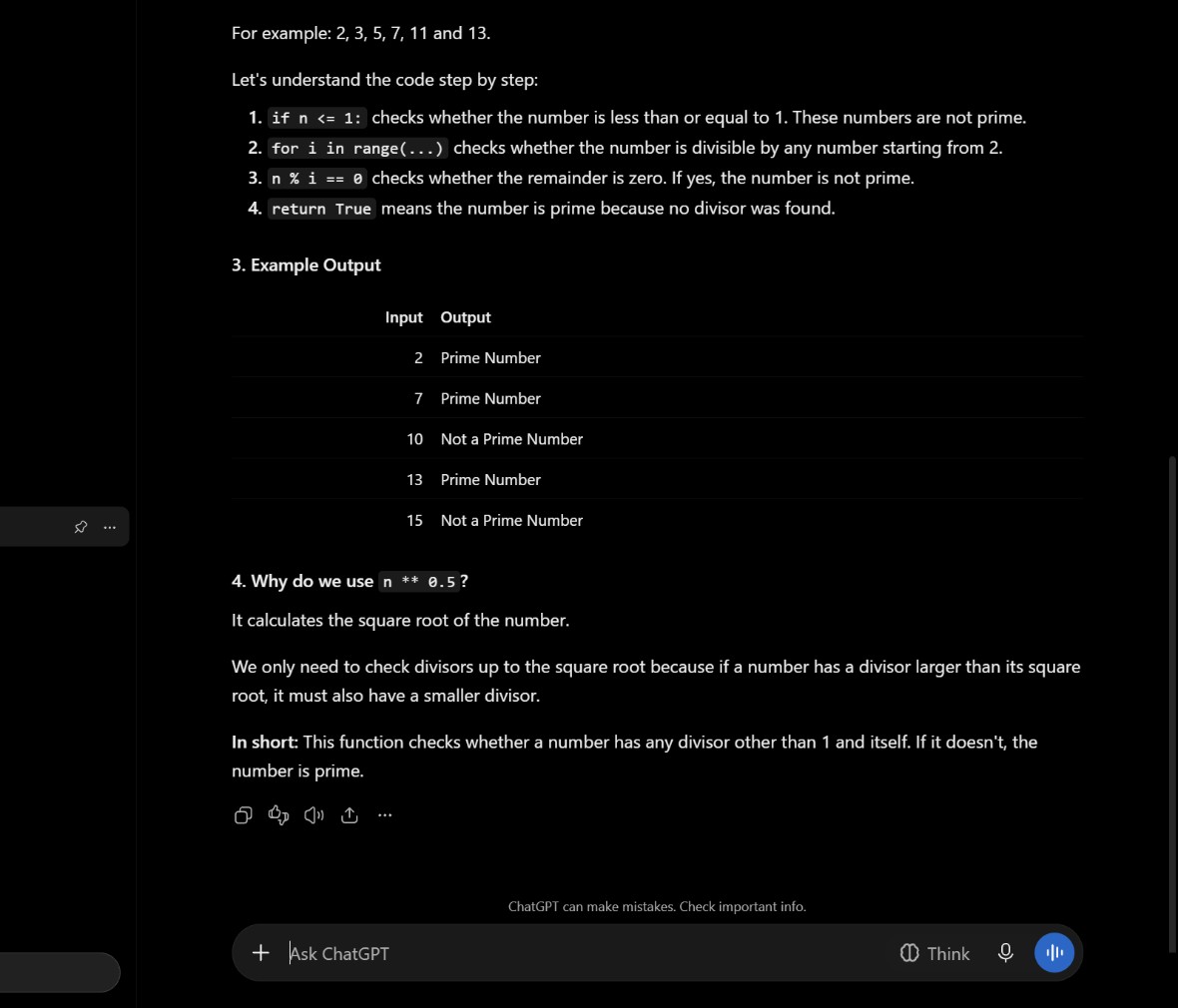
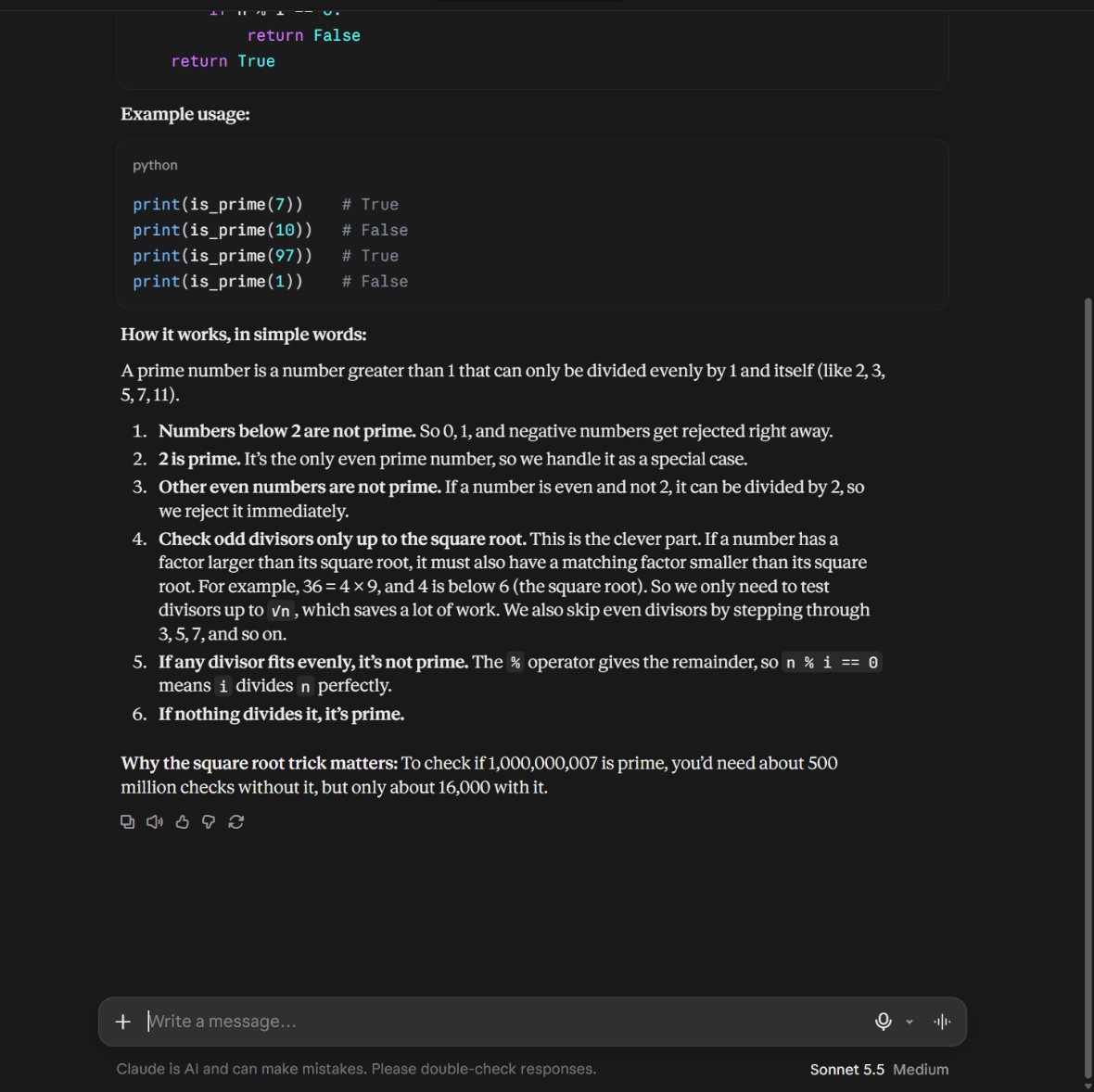
Both functions are correct. The difference is what they hand you. ChatGPT gives the textbook version - loop from 2 to the square root - plus an example block, a table of inputs and outputs, and a short section on why the square root is enough. Thorough to the point of being long.
Claude's version is the one I would keep: it rejects numbers below 2, handles 2 separately, throws out every other even number early, then steps through odd divisors only. Same output, fewer loops. Its explanation of why the square root works - "36 = 4 × 9, and 4 is below 6" - is the line a first-year student needs.
ChatGPT 4/5, Claude 5/5. Winner: Claude.
Round 3: The summary
Prompt: a 300-word paragraph on money habits, then "Summarize this in 3 bullet points."
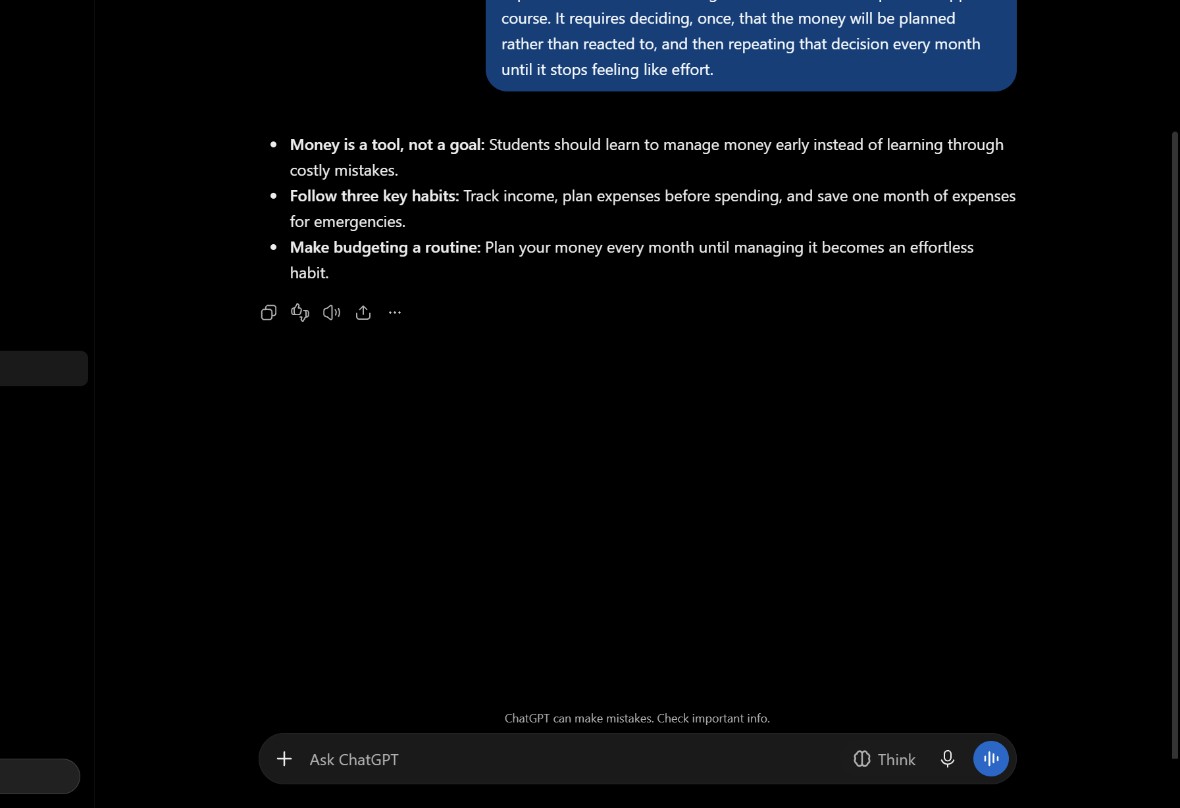
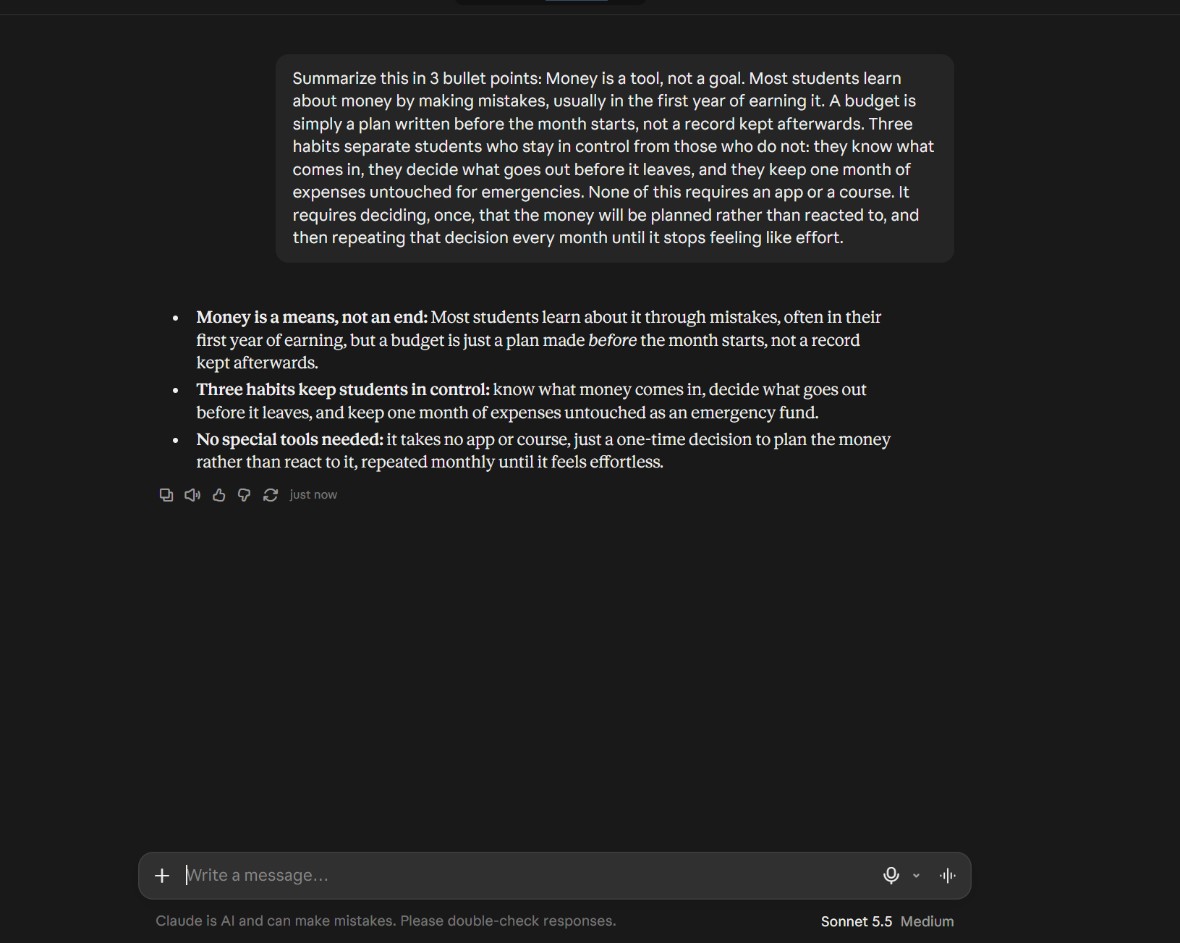
Both tools used the same shape: a bold label, a colon, then the explanation. Neither gave you three bare lines, so the difference is not style, it is length.
ChatGPT keeps each bullet to about a line and a half, so all three fit on a phone screen at once. Claude's run two to three lines each because every point carries an extra clause - "often in their first year of earning, but a budget is just a plan made before the month starts". Accurate, but slower to scan.
ChatGPT 5/5, Claude 4/5. Winner: ChatGPT, on how quickly the three points can be read.
Round 4: The percentage question
Prompt: "A shirt costs Rs 800 after a 20% discount. What was the original price? Show steps."
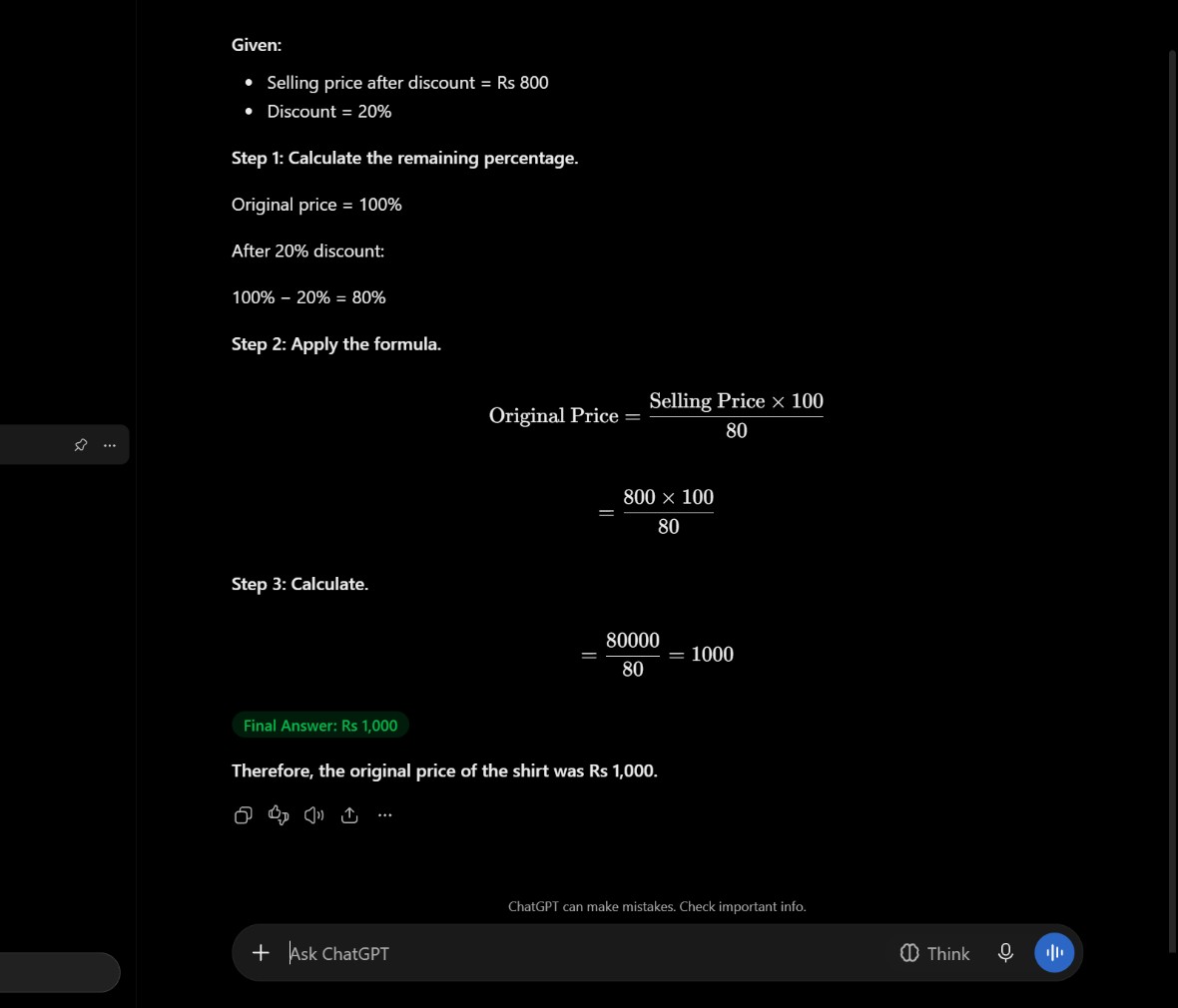
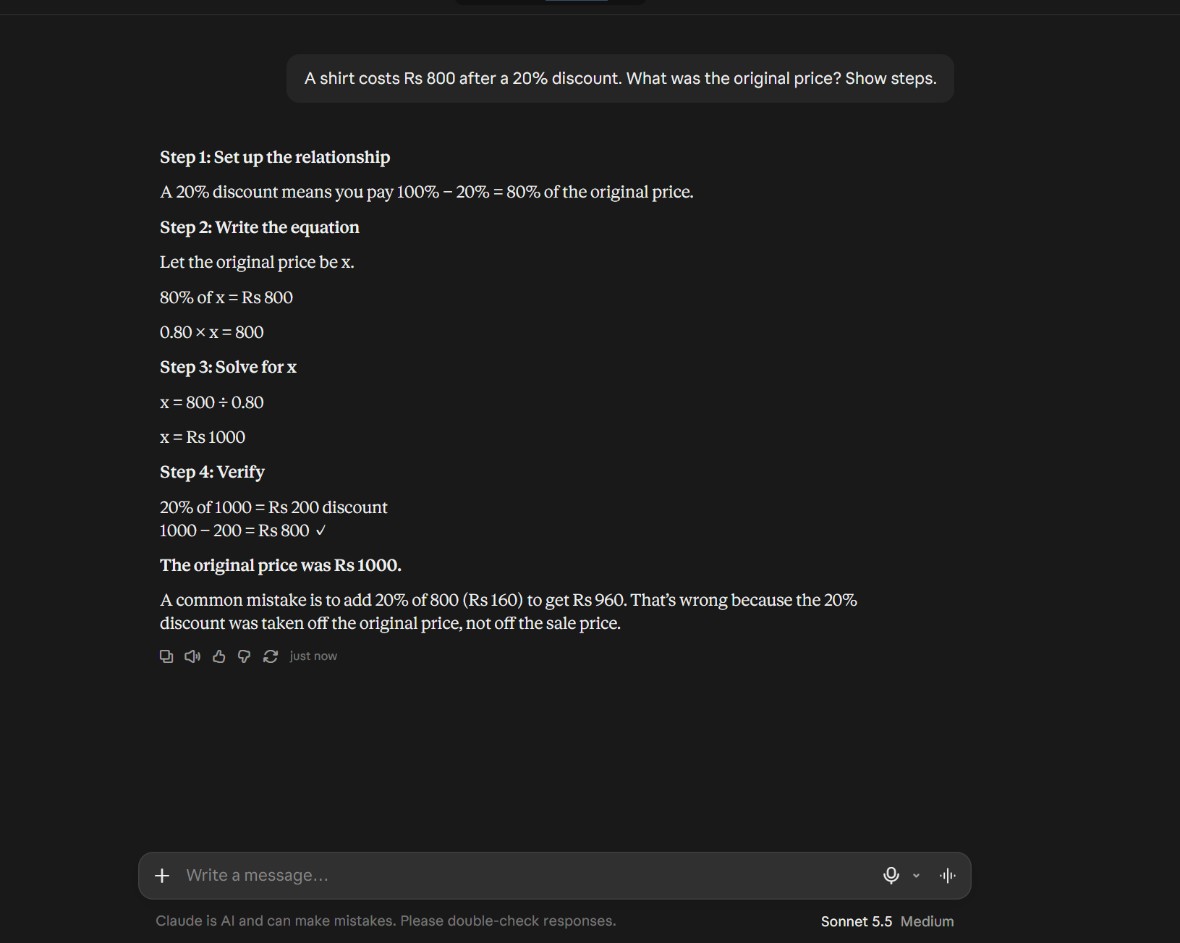
Both answers were correct at Rs 1,000, and both showed the working. ChatGPT used the standard two-step version: drop to 80%, then divide 800 by 0.80. The fraction renders properly in the browser, so there is nothing broken about this one.
What Claude added was the check: it took 20% back off 1,000 to prove it lands on 800, then named the mistake most people make - adding 20% of 800 (Rs 160) to get Rs 960, which is wrong because the discount came off the original price.
ChatGPT 4/5, Claude 5/5. Winner: Claude, on the verification and the warning.
Round 5: The resume line
Prompt: "Write a 3-line resume summary for a first-year college student applying for an internship in marketing."
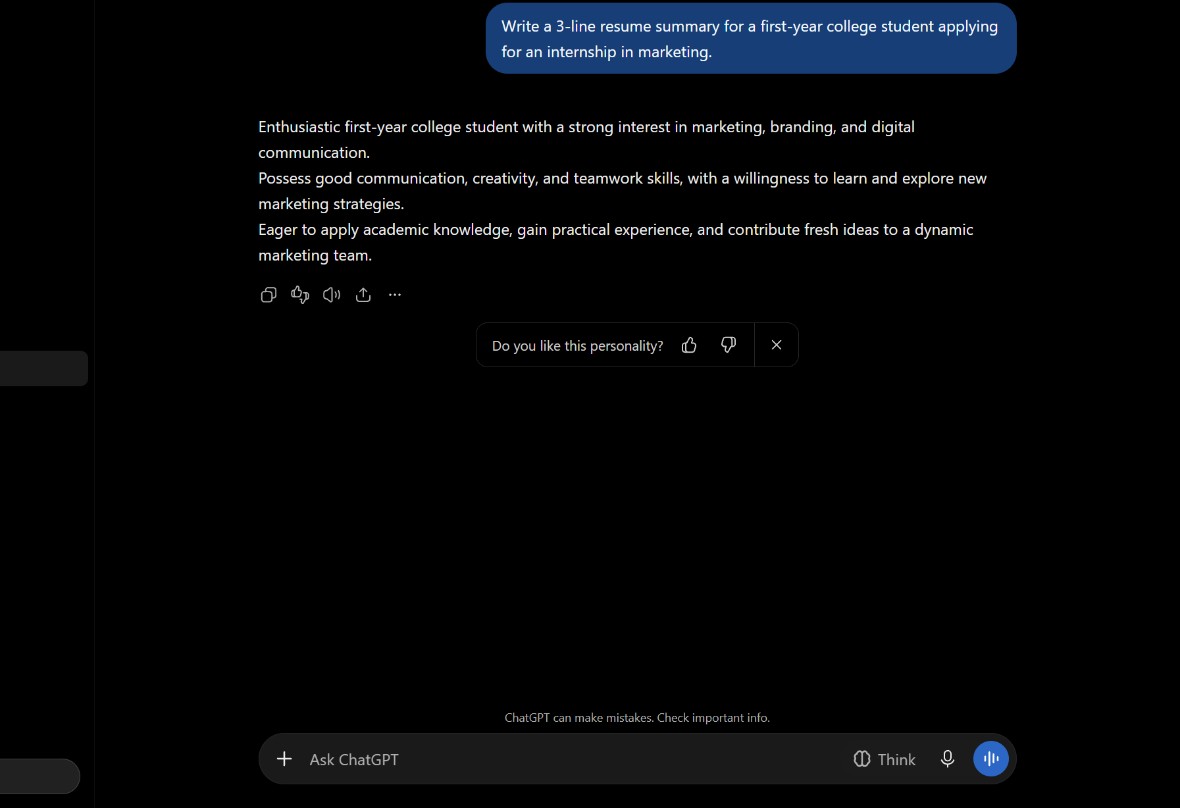
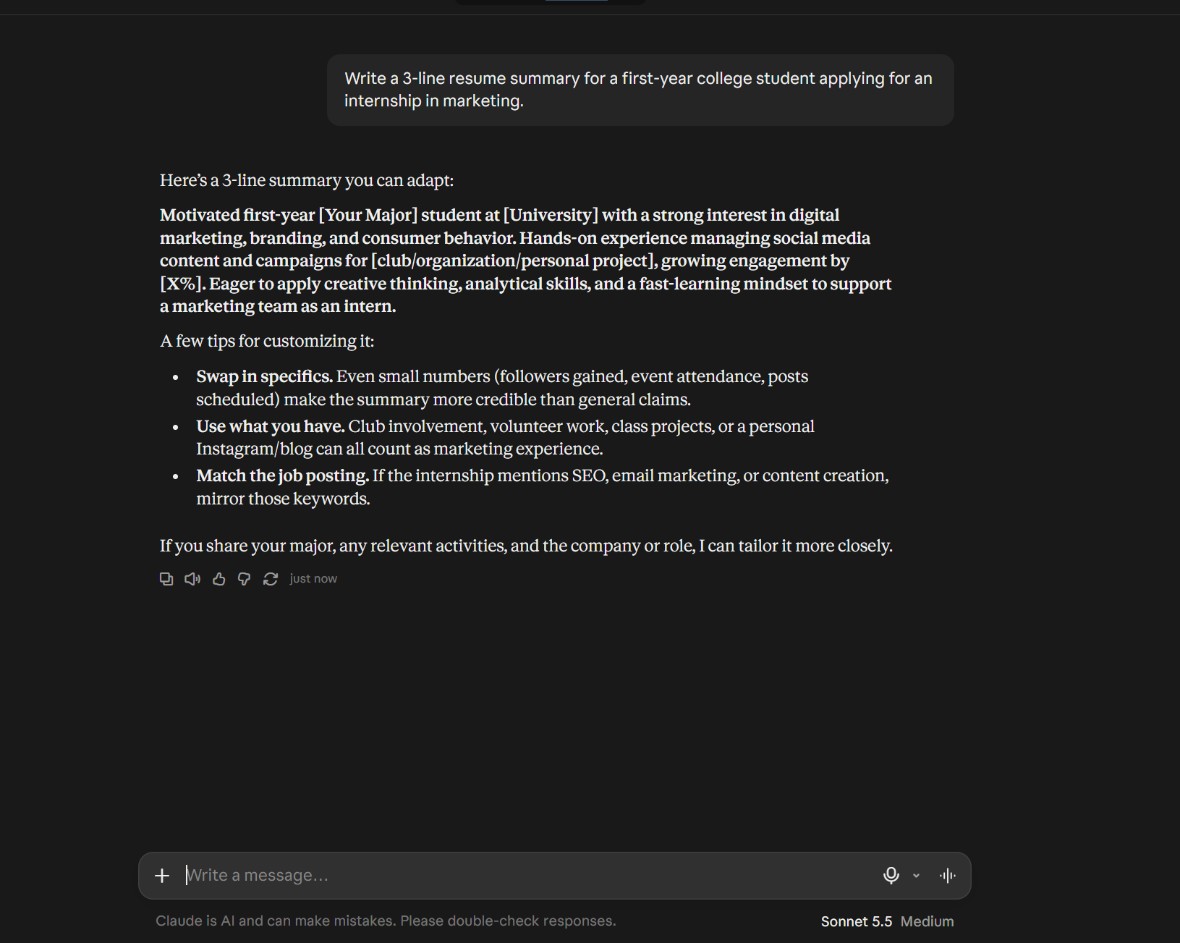
ChatGPT produced three lines you could paste into a resume today - no bracketed blanks, no editing. It then closed with "Do you like this personality?", which is an odd thing to ask someone applying for an internship.
Claude's writing is sharper, but it handed back [Your Major], [University], [X%] and three tips for filling them in. Sensible advice, unfinished output: you cannot send a resume with brackets in it.
ChatGPT 4/5, Claude 3/5. Winner: ChatGPT, on being usable without edits.
Scorecard
| Prompt | ChatGPT Free | Claude Free | Winner |
|---|---|---|---|
| Essay (200 words) | 4/5 | 3/5 | ChatGPT |
| Coding (prime function) | 4/5 | 5/5 | Claude |
| Summary (3 bullets) | 5/5 | 4/5 | ChatGPT |
| Maths (20% discount) | 4/5 | 5/5 | Claude |
| Resume (3 lines) | 4/5 | 3/5 | ChatGPT |
| Total | 21/25 | 20/25 | ChatGPT |
Limits I noticed
I did not hit a limit in this test. Five messages each, no warning, no "you have reached your limit" screen, no slowdown on either tool between 1 and 2 AM IST. That is not proof the free plans have no limits - both do, and they count usage differently - it only means five prompts is nowhere near enough to find them.
What I did notice: nothing carried over between rounds. Every prompt went into a fresh chat, which is how these tools usually get used on a phone between classes.
Verdict
On this run ChatGPT finished one point ahead, 21 to 20, and the split is clean enough to be useful.
ChatGPT Free won wherever an instruction had to be obeyed. A 200-word limit, "3 bullet points", "3 lines": it did what it was told, and the resume summary needed no editing at all. That covers a lot of everyday tasks.
Claude Free won wherever the thinking was harder. Both of its wins were clear - the prime function is the version that survives a code review, and the maths answer is the only one that checks itself and warns you about the usual mistake.
So the useful rule from this run is not "one is better". Use ChatGPT when the instructions matter, use Claude when the reasoning matters, and do not pay for either until you have hit a real limit twice. Which paid plan to pick when you do is a fairer question, and I wrote it up separately in ChatGPT Plus vs Claude Pro.
If you want the wider set of tools for long-form work, the AI writing tools guide covers the ones that beat both of these on essays longer than a page.
Questions people ask
Is ChatGPT Free enough for students?
For everyday tasks in this test, yes. It followed word counts, bullet counts and line counts, and its resume summary needed no editing. It scored 21 out of 25. Where it lost points was the coding round, where the answer was right but far longer than it needed to be, and the maths round, where it did not check its own answer. This is one run with five prompts, so it is a snapshot, not a guarantee.
Is Claude Free better for writing?
Not in this test. Claude wrote sharper sentences in the essay round, but it ran about 40 words over the 200-word limit and scored 3 out of 5, against ChatGPT's 4. Claude's real wins were the coding and maths rounds, where the reasoning mattered more than the wording.
Do the free plans have limits?
Yes, both do, and they count usage differently. I sent five messages to each tool and hit no warning or slowdown, so this test cannot tell you where the limits are. Check each tool's own help page for the current limits.
Related: Zapier free plan limits · n8n self-hosting cost · Buffer cost per channel · AI agent permissions · ChatGPT Business vs Plus

Written by Raghav Walia. I’m a student who tracks what AI tools really cost after the free plan.
Tested on: 16 November 2026